Riot Mobile
- 4.4
- Rating
- 10.00M
- Installs
- Free
- Price

 Analysis by App-foxy
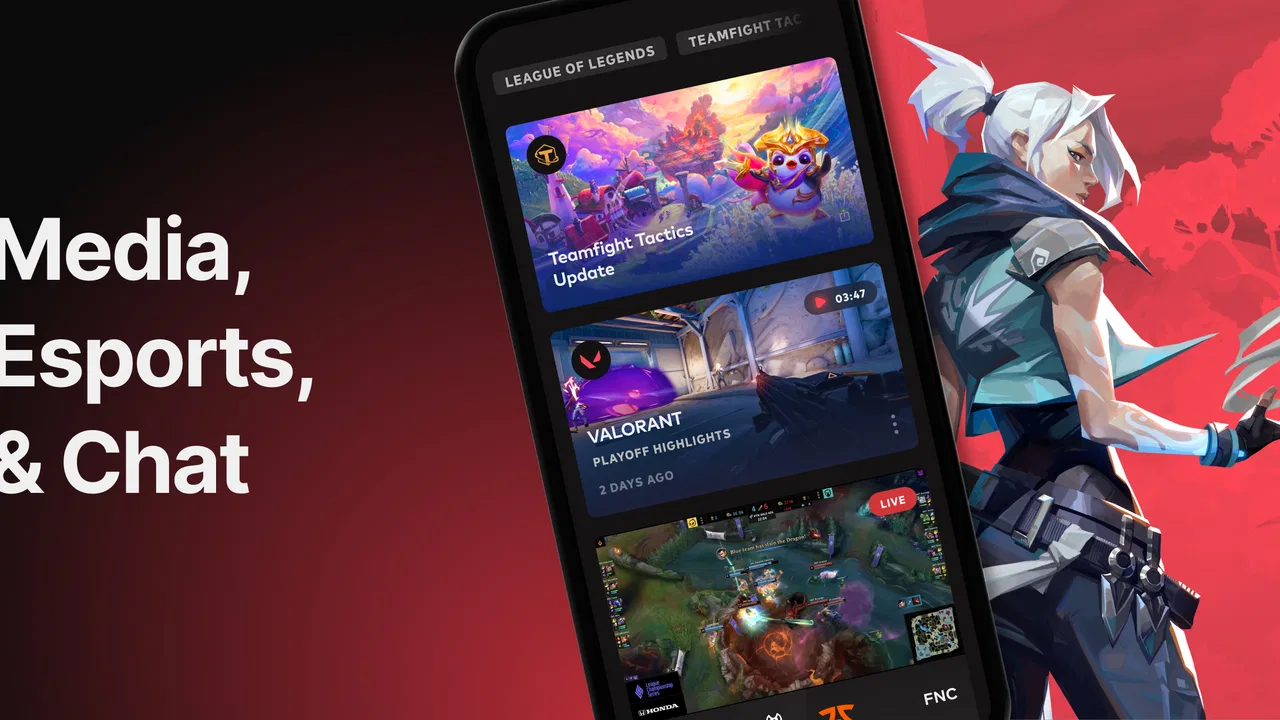
I approached Riot Mobile less like a companion app to leave open all day and more like a practical doorway into Riot’s wider gaming world. That distinction matters in a household where one phone may be shared, a parent may help a younger player stay organized, or several people may need to coordinate around the same gaming schedule. The app is free, belongs to the strategy category, and comes from Riot Games, Inc, but its purpose is broader than a conventional strategy game: its store summary centers on media, esports, and chat.
After spending time with it, my impression is that the app works best for people who already have some connection to Riot’s games, competitive events, or community conversations. It is not designed to replace a game client, and it is not a general-purpose family organizer. Instead, it brings selected parts of Riot’s ecosystem into a mobile format, making it easier to check in, follow what is happening, and keep communication close at hand.
How Riot Mobile fits into a shared household
A realistic use case is a family with one main tablet or a phone that moves between a parent and a teenager. The teenager may use the device to follow esports coverage or chat with teammates, while the parent may occasionally open the app to understand what is attracting the player’s attention. In that situation, the biggest practical issue is not installation; it is knowing whose account is active and whose conversations are visible.
You May Also Like

 Blood Strike: 2.5 Anniversary
Blood Strike’s Loadouts Turn Every Drop Into a Tactical Gamble
A close look at Blood Strike’s custom loadouts: how fast access to signature weapons reshapes its battle royale rhythm, rewards preparation, and narrows the gap between fights.

 Pandora - Music & Podcasts
Pandora’s Music Is Easy to Start, but Harder to Recover
Pandora’s strength is its low-effort path from a seed to a station. Its weak spot is how much confidence it asks you to place in connection, setup, and quiet recovery.

 8 Ball Pool
 Is Built on Rivalries, Rematches, and Routine
A close look at the rivalries, rematches, shared routines, and unanswered safety questions that turn a quick pool match into a persistent mobile community.

 Samsung Music
’s Quiet Strength Is Playing What You Already Own
Its reach comes less from spectacle than from dependable access to a personal library. That simplicity is both the app’s strongest retention engine and its ceiling.

 AccuWeather: Weather Radar
AccuWeather Review: A Quick, Clear Forecast for Everyday Decisions
For everyday plans, the best forecast is the one you can understand quickly. AccuWeather makes rain timing, radar, and local conditions easy to act on, with a few trade-offs.

 Hill Climb Racing
Why Hill Climb Racing Still Turns Crashes Into One More Run
A tiny car, a bumpy hill and one more upgrade: Hill Climb Racing keeps resurfacing because its simple chaos makes every near-miss feel personal.
More From Our News Desk



I would treat the app as an account-specific space rather than a neutral household dashboard. If several people use the same device, switching between personal accounts should become part of the routine. I would not leave an account signed in simply because the device is convenient. That small habit avoids an awkward situation in which another family member opens the app and sees messages, activity, or media intended for someone else.
This is also why I would avoid presenting Riot Mobile as a shared family app. It can support coordination between people who play or follow Riot-related content, but it does not turn a household into one unified profile. Each person should keep their own identity and conversations separate. For a parent, that means helping with the device and discussing sensible boundaries rather than assuming the app itself will manage those boundaries.
The shared-device angle also changes how useful the app feels. On a personal phone, quick access to media and chat is convenient. On a communal tablet, the same convenience can become a privacy concern. I found that the app makes more sense when everyone understands that opening it may reveal the currently active account’s world, not a generic public feed.
Starting cleanly and keeping account boundaries clear
The first setup should be deliberate. I recommend installing the current version, which is 5.2.0, on the person’s own device or on a shared device with a clear agreement about who will sign in. The minimum operating-system requirement is 10, so an older phone or tablet may need attention before anyone spends time troubleshooting the app itself.
For a shared device, I would create a simple handoff habit: finish the conversation or browsing session, return to a neutral screen, and sign out or otherwise switch away before the next person uses the device. I am not presenting that as a special Riot feature; it is simply the safest way to handle a personal communication app on equipment used by more than one person.
Another useful boundary is separating ownership of the device from ownership of the account. A parent may pay for the phone and still not be the right person to answer messages sent to a player. Likewise, a teenager may use a family tablet without assuming that every account on it belongs to them. Making that distinction early prevents accidental replies, misplaced trust, and confusion about who is responsible for a conversation.
I would also decide in advance whether the app is for occasional checking or frequent communication. If the goal is only to follow media and esports, there is no reason to treat chat as the center of the experience. If the goal is coordinating with friends, then the user should understand that messages are personal interactions and need the same care as conversations in any other social app.
Using media, esports, and chat without losing the purpose
The strongest part of Riot Mobile is the way it gathers several Riot-related activities in one place. Instead of opening a browser for news, searching separately for competitive coverage, and using another route for community contact, the app gives fans a mobile starting point. I liked that convenience because it reduces the friction between hearing about an event and actually checking what is happening.
That convenience is most valuable in short sessions. I can imagine opening the app during a commute, between classes, or while waiting for a match or event to begin. It is less compelling if someone wants a long, uninterrupted gaming session, because the app is not a substitute for playing. Its role is closer to keeping a finger on the pulse of Riot’s surrounding content.
Chat adds a different kind of value. It can make coordination easier when friends are deciding when to play or discussing something they have just watched. However, chat is also where the app becomes less suitable for casual household sharing. A person may be comfortable letting others see public media but not private conversations. I would keep those two uses mentally separate, even when they sit inside the same application.
One practical tip is to use the app as a planning checkpoint rather than a constant distraction. Before a group session, check the relevant conversation, confirm the agreed time, and close the app. This is more efficient than repeatedly checking messages throughout the day. It also helps younger users develop a clear difference between coordination and endless scrolling.
For esports followers, the mobile format is particularly handy when the main computer is unavailable. A fan can keep up with media and competitive discussion from a phone without occupying the household’s larger screen. That makes the app useful in shared homes where one person is gaming, another is watching television, and a third still wants to follow Riot-related activity.
Where coordination helps, and where it stops
I see Riot Mobile as a coordination layer, not a full scheduling tool. It can help people communicate around gaming and content, but I would not rely on it to organize a complicated family calendar, manage chores, or replace a dedicated group-planning service. A short message such as “I can play later” fits naturally; a detailed household timetable belongs somewhere designed for that job.
This distinction is important for parents coordinating with children. The app may help a parent understand when a player is discussing a game or following an event, but it does not remove the need for a direct conversation about homework, sleep, device sharing, or availability. I would use it as one communication channel, not as proof that a child is following an agreed routine.
For friends, the best workflow is simple: use chat to settle the immediate question, then confirm the plan in person or through the household’s normal calendar if timing matters. This avoids the common problem of a message being overlooked and everyone assuming someone else has made the final decision.
There is also a trade-off between convenience and concentration. Having media and chat together makes it easy to move from one activity to another, but that can encourage a user to keep checking even after the useful information has been found. I recommend turning the app into a purposeful stop: open it for a specific reason, handle that reason, and leave.
Age context, trust, and responsible use
The content rating is Everyone, which makes the app broadly approachable from an age-label perspective. I would still avoid treating that label as a complete parenting decision. An age rating describes the intended general audience, while real conversations can vary depending on who is using chat, what communities they join, and how much independence they have with online communication.
For a younger user, I would explain three rules before handing over a shared device. Do not assume that a familiar username is a trusted person. Do not share personal details simply because a conversation is friendly. And if a message feels uncomfortable, confusing, or pressuring, show it to a trusted adult instead of trying to solve the situation alone.
Those rules are not unique to Riot Mobile, but they matter here because the app combines community communication with media and competitive interest. A child may enter the app for esports content and then move naturally into conversation. Parents should know that the original reason for opening the app does not define every interaction that follows.
Trust works best when it is specific. Rather than secretly checking every activity, I would agree on what the app is being used for, when it is appropriate, and what should happen if a problem occurs. That approach respects the player’s growing independence while giving the household a clear response plan.
On the other hand, I would not recommend the app for someone who is uncomfortable with account-based communication or who wants a completely passive media experience. The chat element may be useful, but it also means the app is not just a television-style esports viewer. A person who wants only occasional public content may prefer using a simpler, less social route for that purpose.
Performance expectations and everyday friction
Riot Mobile has a strong reason to exist for established Riot fans, but its value depends on how much of that ecosystem the user already follows. Someone who never watches esports, does not need Riot-related media, and has no friends to coordinate with may find the app unnecessary. Installing it simply because it is free is not enough of a reason; the user should have a clear use for the combination of content and communication.
The free price lowers the barrier to trying it, but it does not eliminate the cost of attention. The real question is whether the app saves enough time and effort to deserve a regular place on the phone. For me, it does when I want one mobile entry point for Riot media, esports, and chat. It does not when I am looking for a general social network or a dedicated family planner.
The app has also built a sizable audience, with over ten million installs and an average rating of 4.6 from around 292 thousand ratings. Those figures suggest that it has reached well beyond a tiny specialist group, although popularity alone does not guarantee that it will fit every household. I would still judge it by the user’s habits, device age, and need for Riot-specific communication.
Riot Games, Inc is a developer with a clear connection to the content presented through the app, which gives the experience a sense of focus. The advantage is relevance: the media and competitive context feel connected rather than randomly assembled. The limitation is equally clear: if your interests sit outside Riot’s games and communities, the app’s scope may feel narrow compared with broader gaming news or messaging alternatives.
The release history reaches back to February 23, 2016, so this is not a brand-new experiment. That maturity is reassuring for someone who wants an established companion rather than a short-lived novelty. Still, an older app lineage does not mean every device will feel equally comfortable, which is why checking the operating-system requirement before setup is worthwhile.
How it compares with familiar alternatives
Compared with a normal game client, Riot Mobile is better for keeping up with surrounding activity and communicating away from the main gaming session. A game client is usually the place to launch or manage a game; this app is more useful when the player wants media, esports context, or chat from a mobile device. I would use both for different jobs rather than expecting one to replace the other.
Compared with a general messaging app, Riot Mobile is more focused but less universal. A family group chat can coordinate dinner, transport, and school matters, while Riot Mobile is more natural for conversations tied to Riot interests. If the household needs one channel for everything, a general messenger is the better choice. If the group is already talking about Riot-related play and events, the focused setting can reduce unrelated noise.
Compared with a broad esports or gaming news app, Riot Mobile has the advantage of being closer to Riot’s own ecosystem. That can make it more direct for fans who want this particular publisher’s media and community activity. The trade-off is that it is not the best single destination for multiple publishers, platforms, or unrelated competitive scenes.
Compared with a family calendar, it is much more conversational and much less structured. I would never use it as the only place to record a child’s weekly commitments or a household’s device schedule. Its strength is the quick exchange around an interest; a calendar remains better for durable plans that nobody should have to search through chat to find.
Who should install it, and who should skip it
I would recommend Riot Mobile to an active Riot fan who wants mobile access to media, esports, and chat without jumping between several unrelated services. It is also a sensible choice for friends who already coordinate around Riot games and for households where someone wants to follow competitive content without taking over the main screen.
I would be more cautious about recommending it to a person who only wants to play games and never follows surrounding content. The app will not add much if the user has no interest in media or esports and does not need its communication side. I would also suggest a different tool for families seeking parental controls, detailed schedules, or one shared account for everyone, because those are not the reasons this app makes sense.
For a younger player, I would install it only alongside a clear conversation about account ownership, device handoffs, and online trust. The Everyone rating is a useful starting point, but responsible use still depends on the household’s expectations and the child’s ability to handle conversations sensibly.
My household verdict
Riot Mobile is a focused companion for Riot’s media, esports, and chat experience rather than a replacement for a game client, a family organizer, or a universal messenger. I appreciate the way it makes short mobile check-ins convenient, especially when a shared screen is unavailable. I also appreciate that its purpose is easy to understand once the account boundaries are handled properly.
My main reservation is that convenience can blur into unnecessary checking, particularly on a shared device where several people may assume the app is harmless to open. I would keep accounts separate, treat chat as personal, and use the app for specific coordination instead of leaving it as an always-on household channel.
In the end, I think it is a good fit for a Riot-centered home or friend group that wants one mobile place for relevant content and conversation. It is a weaker fit for people outside that ecosystem or for families looking for built-in management of schedules and relationships. With those expectations in place, Riot Mobile is most useful when it connects an existing interest rather than trying to create one.
FAQs for Riot Mobile
01What is Riot Mobile and how does it enhance the gaming experience?
Riot Mobile is the official companion app for Riot Games, designed to keep you connected with your favorite games like League of Legends, VALORANT, and more. It provides real-time updates, match history, and social features, allowing players to interact with friends and stay informed about game progress, news, and events.
02Is Riot Mobile available on both Android and iOS platforms?
Yes, Riot Mobile is available for download on both Android and iOS platforms. You can find it on the Google Play Store for Android devices and the Apple App Store for iOS devices. The app is designed to offer a seamless experience across all supported devices, ensuring players can stay connected anytime, anywhere.
03Are there any costs associated with using Riot Mobile?
Riot Mobile is a free-to-download app with no hidden subscription fees. All the core features, such as game updates, social interactions, and match history, are accessible without any additional charges. However, some in-game purchases or premium content linked to the games may have costs, but these are separate from the app itself.
04What privacy measures does Riot Mobile have in place?
Riot Mobile prioritizes user privacy and data protection. The app requires account login, ensuring your data is secure and linked to your Riot Games account. It adheres to Riot Games' privacy policies, which include data encryption and compliance with relevant data protection regulations. Users can manage their privacy settings within the app to control data sharing.
05Can I use Riot Mobile to communicate with my friends while playing?
Yes, Riot Mobile includes robust social features that allow you to chat with friends, view their game status, and coordinate gaming sessions. The app includes instant messaging and notifications, making it easy to stay connected and plan your next gaming adventure with your friends efficiently.
Pros
- User-friendly interface for easy navigation.
- Real-time updates on matches and events.
- Customizable notifications for your favorite teams.
- Comprehensive player and team profiles.
- Integrated chat feature for community interaction.
Cons
- Requires constant internet connection.
- Occasional lag during live updates.
- Limited offline functionality.
- Some features locked behind sign-in.
- Large app size may impact device storage.

Riot Mobile
Gallery